Choose OCR for a scanned page
A scanned PDF may show clear Arabic writing while containing only a page image. Try selecting a word in your PDF viewer. If there is no selectable text, use Read a scan in PDF editor. The separate PDF to text tool extracts an existing text layer; it does not recognize words in pictures.
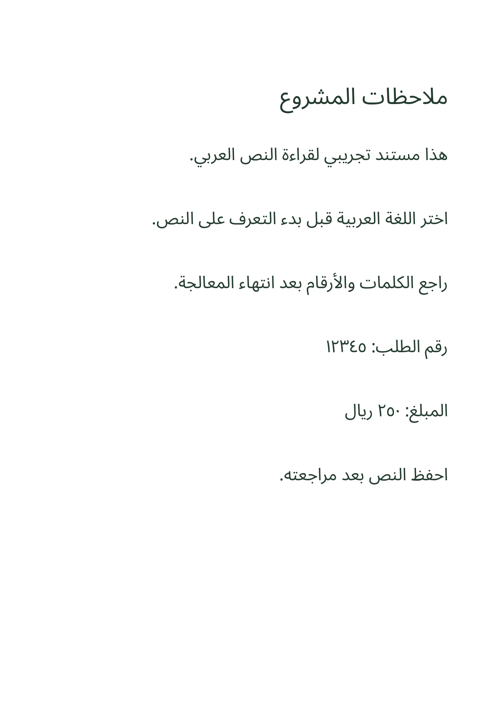
This guide uses a clean, one-page Arabic practice scan. It contains ordinary sentences, a reference number and an amount, with no personal information. It has no text layer, so it is suitable for trying OCR.
Recognize one page at a time
- Open your PDF. Use PDF editor and choose the scanned file. The editor supports PDFs up to 25 MB and 50 pages. Select the page you want to read.
- Open Read a scan. In the text panel, set “Document language” to “العربية” for this sample. Choose “English + العربية” when the actual page contains both languages. Changing the interface language alone does not choose the OCR language.
- Recognize this page. Wait for processing to finish. This command recognizes the current page, not every page in the document. For another page, select it and run recognition again.
- Open the transcript. Expand “Review and download recognized text.” Compare the transcript with the scan and edit errors in the text box. Then choose “Download text (.txt).” Save each page’s text before moving on.
Edits in the transcript box affect the TXT download only. They do not change the PDF or add a searchable text layer. Changing words on the PDF is a separate editor action.
What our Arabic sample revealed
The recognition test recovered the sentences, but it misread the reference number and the amount. Those are exactly the fields that can look plausible at a glance and still be wrong. Compare each digit with the original, including Arabic-Indic digits such as ١، ٢، ٣.
| Recognized text: needs correction | Correct text in the scan |
|---|---|
| رقم الطلب: ١!!1“60 | رقم الطلب: ١٢٣٤٥ |
| المبلغ: 70٠ ريال | المبلغ: ٢٥٠ ريال |
Use this reference transcript to check the entire sample:
How this OCR example was checked
Tested on 15 September 2026 with the site’s Arabic language model and the same Tesseract 7 core files, using Arabic-only recognition and the editor’s rendering scale. This was a local engine test. Line breaks, punctuation and errors may differ in your browser; it is not an accuracy guarantee.
Review and improve the result
Check names, reference numbers, amounts, dates, punctuation and line order. Compare dots above and below Arabic letters and look for missing or added spaces. If the page mixes Arabic and English, check the order of Latin words and numbers as well.
If little text is recognized, try a clearer, upright scan with even lighting and no cut-off edges. Dense tables, columns, low contrast and handwriting may need substantial manual correction. For the next page, save your corrected TXT first, then repeat the recognition steps.
Keep the scan alongside the corrected transcript. A TXT file contains plain text; it does not preserve the original page layout, images or table formatting.