Ready File Tools · 23 September 2026
When a fixed copy is useful
A filled PDF can contain interactive fields: a text box, checkbox or selection list. Flattening converts supported saved field appearances into page content. It is useful when you want to share the reviewed appearance of a completed form and do not need the recipient to fill the same fields. Keep an editable original for future corrections.
Flattening is different from scanning a page or converting it into an image. This tool fixes supported form fields; it does not deliberately rasterize the entire document. It also does not lock the PDF against all editing.
Use the practice form
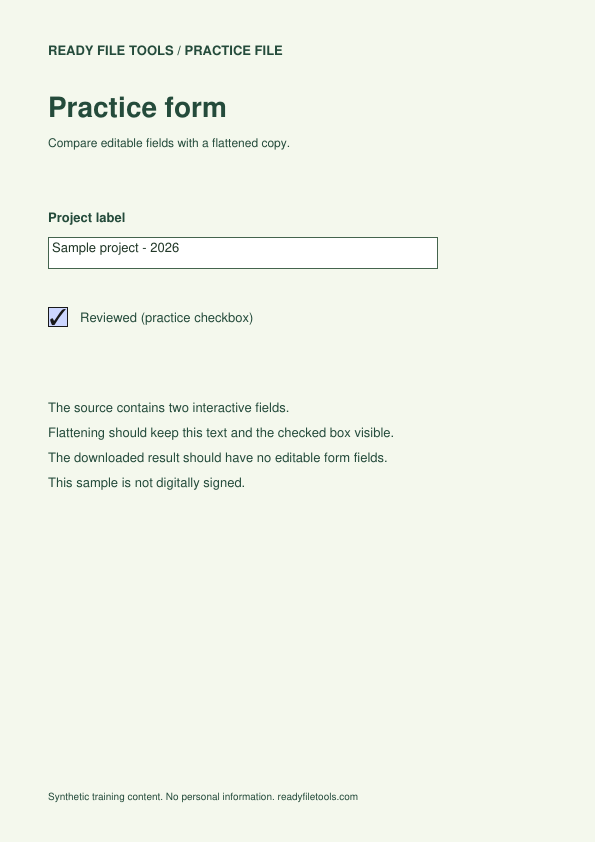
The source below has two fields: a project label containing Sample project - 2026 and a checked Reviewed checkbox. It contains no personal data and is not digitally signed. Open the original in a viewer that supports form filling; you should be able to interact with both fields.
- Open Flatten forms and select the editable practice PDF.
- Create the result and download the new PDF.
- Open the source and result side by side in your PDF viewer.
- Check that the project value and checkmark remain visible and that the result no longer presents those two fields as editable controls.
Compare three things, not just the preview
| Check | Source | Expected result |
|---|---|---|
| Page count | 1 | 1 |
| Visible project label and checkbox | Filled and checked | Same appearance |
| Interactive form fields | 2 | 0 |
A browser preview alone is not enough: some previews do not support filling even when the PDF has fields. Try an actual form-capable viewer and make sure you opened the downloaded result, not a cached preview of the source.
Why flattening can fail
A field can contain a stored value but lack a saved appearance. The tool refuses that case rather than knowingly producing an invisible answer. Open the source in its original application, save a reviewed copy, and try again. XFA forms are not supported. If the tool reports that no fields were found, the document might already be flat or might simply be a scanned picture.
What flattening does not protect
It is not secure redaction, a password, or a guarantee that other software cannot edit the page. It does not remove personal details printed in the document. A drawn signature and a certificate-based digital signature are different; changing a digitally signed PDF can invalidate its signature. For an official signed document, follow the receiving party's instructions and retain the original.
How this example was checked
On 23 September 2026, the site's PDF processing code created the downloadable flattened result. A separate PDF reader confirmed two source fields with saved values, no remaining field widgets in the result, and the retained project text. Rendering both PDFs at 72 DPI produced identical page pixels for this sample. This is a reproducible sample check, not a guarantee for every form type or viewer.
Practice and comparison files